This morning the Adobe Developer Connection posted two articles to support the FMRMS launch:
Introducing Flash Media Rights Management Server (by Desiree Motamedi)
http://www.adobe.com/devnet/logged_in/dmotamedi_fmrms.html
Exploring content protection options with Flash Media Rights Management Server (by Laurel Reitman)
http://www.adobe.com/devnet/flashmediaserver/articles/fmrms_content_protection.html
Both are featured on the FMS Developer Center:
http://www.adobe.com/devnet/flashmediaserver/
as well as the ADC home page:
http://www.adobe.com/devnet/
Wednesday, March 19, 2008

Flash Media Rights Management Server Released
A new addition to the Flash Media Server family will be announced (and start shipping) today. The Flash Media Rights Management Server (or FMRMS - who doesn't love a new acronym to use at cocktail parties?) is a new content protection solution that helps safeguard video content created for Adobe Flash technology. With FMRMS, content producers can now deliver and protect their content, both online and offline - through the Adobe Media Player and applications that run on Adobe Air software.
With FMRMS in play, Adobe now offers copy protection for both online/streaming content, as well as downloaded/offline content. This is the first time that you're able to protect FLV files on desktops - so this is pretty huge!
The interesting thing is that FMRMS will enable new business models that go beyond the traditional download-to-own or download-to-rent models, but will also allow monetization of content through advertisement, online and offline!
Lots more information coming soon to Adobe.com, so stay tuned!
Here's the overview slide deck:
And the FAQ:
With FMRMS in play, Adobe now offers copy protection for both online/streaming content, as well as downloaded/offline content. This is the first time that you're able to protect FLV files on desktops - so this is pretty huge!
The interesting thing is that FMRMS will enable new business models that go beyond the traditional download-to-own or download-to-rent models, but will also allow monetization of content through advertisement, online and offline!
Lots more information coming soon to Adobe.com, so stay tuned!
Here's the overview slide deck:
And the FAQ:
Tuesday, March 18, 2008
kuler update - new release!

Today is the latest release of kuler, the Adobe web-hosted application for exploring, creating and sharing color themes.
New! Use color extraction to quickly and automatically generate a color theme from any uploaded photo or other image. Explore different moods, such as bright or muted, to see different colors, or drag the markers to select colors. The color extraction feature will engage with the creativity of the kuler community in new ways, while helping to expand the range of interesting themes on the site.
Other new features:
- Endless favorites: Now save as many themes as you like, and browse them in your Mykuler area
- Browse by Random (randomly selected) themes, in addition to Highest Rated, Newest, and Most Popular
New AS3 Reference Guide Published
 Hot off the presses, the official Adobe technology platform ActionScript reference for RIA development is now available. The notebook-format document provides a complete ActionScript 3 API listing for Flash Player, Flex 3 and Adobe AIR.
You can read Mike Chambers' blog entry about it, or download the PDF here. It's distributed under the Creative Commons Attribution-Noncommercial 3.0 Unported License, so you are free to edit and redistribute the file.
Tuesday, March 4, 2008
Getting your web design to the browser
I recently presented an online seminar on Photoshop CS3 and Dreamweaver CS3 integration/workflow late last month, and I got a lot of requests for the demo files and additional documentation. Now, to be honest, I didn't create the assets or the workflow script, so I wasn't sure what the official line was on sharing these things with seminar attendees.. well, as it turns out, there is a publicly available document on Adobe.com that provides step-by-step instructions plus the source files. Unfortunately, I wasn't able to find this document on the site myself, so I've just shared the PDF and source files here:
Link to Source Files
Enjoy!
Link to Source Files
Enjoy!
Flash Media Server 3 White Paper
The FMS team recently released a technical white paper which provides a great overview of the server technology/platform:
Friday, February 29, 2008
Engage 2008 (From Adobe Developer Connection)
 Engage 2008—held in San Francisco on February 25, 2008—is Adobe's annual conversation on the future of applications and the web, bringing together key thought leaders and influencers to share perspectives from a broad spectrum of industries. In this video, Adobe CEO Shantanu Narayen and CTO Kevin Lynch begin the dialog and show you what's coming next from Adobe.
Watch the video here: http://www.adobe.com/devnet/videos/engage_2008/
More news from kuler...
More news from kuler (kuler.adobe.com), an Adobe web-hosted application for exploring, creating and sharing color harmonies. A new version of kuler desktop is now available, to accompany the official release of AIR , the Adobe development platform to deploy rich Internet applications to the desktop. The Emerging Creative Technologies (ECT) team at Adobe is excited to support the AIR development platform and to extend the current kuler functionality of RSS feeds.
New features include (Feature Guide below:
Moving forward, as additional functionality becomes available in the AIR platform, new features will be added to the kuler desktop.
New features include (Feature Guide below:
- Browse color themes from the kuler website while offline (up to 100 themes cached per feed)
- Drag and drop themes onto your own desktop as transparent "tear offs," which can be scaled and viewed over any application
- Access themes from Mykuler (must be signed in)
- Download themes as ASE (Adobe Swatch Exchange) files directly from the kuler desktop (must be signed in)
- New RSS feed "Random"
Moving forward, as additional functionality becomes available in the AIR platform, new features will be added to the kuler desktop.
Thursday, February 28, 2008
A quick media hit
As I mentioned earlier, I've been doing a few press interviews/briefings for the AIR launch, and I actually got quoted in an article.. for your reading pleasure:
http://www.itworldcanada.com/a/News/9414fcd0-b94d-4635-8936-bb4b2fca7abd.html
http://www.itworldcanada.com/a/News/9414fcd0-b94d-4635-8936-bb4b2fca7abd.html
Sunday, February 24, 2008
Adobe AIR (& Flex 3) now in production
 Absolutely huge news!
Adobe AIR just went 1.0. As the official Adobe spokesperson for AIR in Canada, I've been busy doing over/interviews with journalists across the country in preparation for the AIR launch.. and it's finally here!
With the announcement, Adobe also added to the already impressive list of customers (eBay, AOL, FedEx, Nasdaq, SAP to name a few). Newcomers include The New York Times, BBC, and Deutsche Bank. Pretty darn impressive for a 1.0 product (whatever happened to waiting for the first service pack, or a 1.1 update??)
Also, Adobe Flex 3, the free open source framework for RIA development, moved from beta to production.. so all in all, a super exciting time to be at Adobe (or to be an Adobe customer)!
Some of my favourite AIR examples that you can install today:
Shifd from NYT
Others at the AIR Showcase site...
Fellow SE an Oscar Winner?
This is a somewhat random post - definitely not related to Adobe technology, but definitely related to an Adobe employee.


I initially heard about the movie 'Once' from my wife when she saw the premiere at Sundance last year (I was working the festival, and my wife Kaniz came along for the fun), which just won the best song Oscar tonight. So even though the movie has been out for some time, I didn't actually get to watch it until a month ago. Imagine my surprise when I saw Kyle Thompson, a fellow Adobe SE, moonlighting as the lead actor under the name 'Glen Hansard'.
Now, I'm sure that Kyle will deny this.. but for your consideration, I submit Exhibit A (a promotional picture of 'Glen' for the movie):
And for Exhibit B, here is Kyle with his adorable daughter Elise:
And here's the coup d'etat - Kyle/Glen with his guitar:
Ladies and gentlemen of the jury, I rest my case!
Wednesday, February 20, 2008
Check the latest Adobe EDGE issue
 FYI, the February 2008 issue of Adobe EDGE has a lot of interesting content, including a discussion of open source at Adobe as well as an overview of Adobe Media Player and RSS feeds.
Remix (Adobe Premiere Express) Online Seminar
 Have you checked out MTV Remix yet? The site lets users produce their own music videos for various artists using on a collection of video clips, graphics, transitions, etc. The tunes are courtesy of the musicians, the graphics are probably courtesy of MTV, but the technology is all Adobe. The Remix site is actually one rendition of several online of Adobe Premiere Express.
If you're interested in checking out a live online seminar on the topic, there's one happening on February 27th - go to the Adobe event registration page for more information.
Here is some more detail from the invite:
Join us to learn how entertainment and media companies such as MTV, YouTube, and Photobucket are generating more advertising revenue and creating fun, interactive user experiences on the web with Premiere Express, Adobe’s popular online video editing application. With Adobe® Premiere® Express, anyone can make videos that rock in minutes.
Let your site’s users reorder, split, and trim video clips; add music, transitions, and titles; and then make it all their own with a mix of favorite photos, graphics, and animation. Adobe Premiere Express is an easy-to-use, Flash-based, cross-platform application that gives users the ability to mash up and remix user-generated, professionally produced, and branded content, while extending advertising and sponsorship opportunities and keeping your audience engaged longer and returning more often through contests, promotions, viral campaigns, and more.
This eSeminar will feature a guest speaker from MTV Networks to discuss how Premiere Express is used for their remix.mtv.com website.
Tuesday, February 19, 2008
Flash Video 101 presentation
It just occurred to me that I had promised the AIGA Philadelphia folks a copy of my Flash Video presentation, and I forgot to post it.. so here it is:
Director 11 Released!
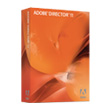 In case you missed it, Adobe released a brand new version of Director last night at the Game Developer Conference in San Francisco. The official press release can be found here, or you can review the product page to read up on what's new in this release.
From the product page, here's a quick list of top features:
- Support for more than 40 video, audio, and image file formats
- Native 3D rendering with DirectX 9 support
- Advanced physics with the included AGEIA™ PhysX™ engine
- Support for Adobe Flash CS3 Professional software and video created with Flash
- Unicode support, including multimode publishing
- Enhanced text rendering engine
- Enhanced user interface
- Enhanced Script Browser and full JavaScript support
- Bitmap filters
- Xtra plug-ins
Monday, February 18, 2008
Adobe Updater Tip
In my role, I have a lot of tips and tricks land in my Inbox, courtesy of other Adobe employees much smarter than me.. so thought I would start sharing some of this extremely useful knowledge.
 Here's one from today on the Adobe Updater, which I'm sure most of you have come to - how should I say it - fall out of love with. Anyway, to avoid having the updater run all the time (the default is every week, but it sure feels like it's a lot more often), launch the Adobe Updater application, bring up the app's Preferences and either deselect automatic updates or select only the applications you're interested in updating:
 Here's one from today on the Adobe Updater, which I'm sure most of you have come to - how should I say it - fall out of love with. Anyway, to avoid having the updater run all the time (the default is every week, but it sure feels like it's a lot more often), launch the Adobe Updater application, bring up the app's Preferences and either deselect automatic updates or select only the applications you're interested in updating:
- On the Mac - this application resides in Applications > Utilities > Adobe Utilities > Adobe Updater.
- On the PC - you can find the application at Program Files > \Program Files\Common Files\Adobe\Updater 5
Friday, February 15, 2008
Flashin' It @ AIGA Philadelphia
 I had an opportunity to present Flash to a fantastic audience at an event hosted by the Philadelphia chapter of the AIGA. During the session, I promised that I would share some of the resources I mentioned during my marathon 4+ hour session:
Developer Connection - www.adobe.com/devnet
Design Center - www.adobe.com/designcenter
(Both of these sections are organized by products and categories. If you are new to Flash, check out the 'Getting Started' pages.)
Adobe Events - www.adobe.com/events.
Adobe runs a lot of live events globally, but you can always attend a live eSeminar on a variety of topics and products. Check out this link.
Or you can watch a recorded eSeminar at your convenience at - lots of great stuff here. For example, here's a list of all the Flash-related recorded seminars.
Other non-Adobe (free) resources:
gotoandlearn.com
kirupa.com
Other non-Adobe (not-so-free) resources:
lynda.com
totaltraining.com
xtrain.com
Bridge Home - if you have Bridge CS3 installed on your computer, you can find a lot of the resources listed above right inside Bridge Home ('home' icon at the top of the Favorites panel).
Also, if you're looking for a particular resource on Adobe.com, you can try the search feature on the site - or you can use Google (e.g. "cs3 video workshop site:Adobe.com" - which will search for the keywords 'cs3 video workshop' within the Adobe.com domain).
Lastly, if you're interested in working with video in Flash, I would highly recommend the book Adobe Flash CS3 Professional Video Studio Techniques by Robert Reinhardt. Very good information covering all aspects of video - from shooting video to encoding to deployment.
One other note: if you're interested in AIR, the Adobe Media Player or Flex 3, check out Adobe Labs - http://labs.adobe.com.
Thursday, February 14, 2008
On the road to Memphis
 I'm in Memphis today to present Flash to the local AIGA chapter. Actually, since my colleague Josh Margulis is officially credited as the presenter, I only provided some assistance. As one would expect, the AIGA folks were pretty creative about promoting an event which takes place on Valentine's Day!
Since I haven't had a chance to present with Josh before, I was really looking forward to it. The only hitch was that it ain't easy getting to Memphis from Toronto (and then from Memphis to Philly where we're presenting at an event the next day).
So just to give you a little peak into the life of an SE, here's my itinerary for Feb 14:
4am ET - wake up
4:30am-4:50am - car service to Toronto airport (YYZ)
4:50am-5:50am - get through customs & security
6:25am - YYZ to Chicago, IL (ORD), arr 7:18am
8:25am - ORD to Memphis, TN (MEM), arr 10:13am CT
10:45am CT - Get to event venue (by smelly cab)
3pm - Finish up session (skip lunch), wait 25 mins for a cab back to the airport
4:20pm - Get to the airport, eat a crappy lunch/dinner
5:55pm - Start writing this blog entry
6:57pm - Fly from MEM to Charlotte, NC (CLT), arrive 9:30pm ET
10:15pm ET - CLT to Phialdelphia (PHL), arrive 11:35pm
12:20am - Check into hotel
So that's 1 province and 4 states in a 20+ hour day. It might sound like fun, but it wears on you after a bit..
But in the end, it's worth it. I get to do what I love (talk) and I get to meet some great people. For example, the AIGA folks gave me a couple of parting gifts: a 'Day for Flash Lovers' t-shirt AND a Sun Studio, Memphis shirt!
Friday, February 1, 2008
Free Flash Lite 3 Training in NYC
 If you're a designer or developer interested in Flash Lite 3.0, Adobe is offering a (free!) three-day mobile application development training course.. details as follows:
Wednesday, Feb 27 -Friday, Feb 29 -- 9:00am – 5:00pm
Location: Adobe NYC Office (8 West 40th St., between 5th & 6th Ave.)
Here's what they're suggesting you bring with you to the course:
- Bring your own laptop
- Bring a Nokia S60 v3 flash enabled device like an N73 or N95 for instance
- Bring your own phone cable that connects from your laptop to your handset to download your content
- Install Flash CS3 Professional on your laptop
(sunguyen at adobe dot com) by including your name, email address and mobile phone number.
I've also included the course outline below:
Monday, January 28, 2008
FMS goodies courtesy of Mr. Towes
A few Flash Media Server related items, courtesy of Mr. Kevin Towes, technical product manager extraordinaire for FMS:
Here's a tool to help you calculate bandwidth for Flash Video:
http://www.adobe.com/devnet/flash/apps/flv_bitrate_calculator/index.html
Also… a beginner’s guide to Flash Media Server 3
http://www.adobe.com/devnet/flashmediaserver/articles/beginner_vod_fm3.html
And… a great article by Desiree Motamedi, product marketing manager for FMS
http://www.adobe.com/devnet/logged_in/dmotamedi_fms3.html
Enjoy!
Here's a tool to help you calculate bandwidth for Flash Video:
http://www.adobe.com/devnet/flash/apps/flv_bitrate_calculator/index.html
Also… a beginner’s guide to Flash Media Server 3
http://www.adobe.com/devnet/flashmediaserver/articles/beginner_vod_fm3.html
And… a great article by Desiree Motamedi, product marketing manager for FMS
http://www.adobe.com/devnet/logged_in/dmotamedi_fms3.html
Enjoy!
Subscribe to:
Posts (Atom)
